More sales conversations. More time to grow.

    Your competitors run the ads.
    You build the relationships.

    Find people engaging with their ads. Turn that interest into a connection, a conversation, and a path to your offer—with Friender automating follow-up and tracking the journey to a sale.

    Already have an audience? Use the same system to turn your existing connections into customer relationships.

    Real Friender screens with labeled workflow illustrations. Read the walkthrough.

    Start my 7-day free trial

    $0 for 7 days. Then $99/month. A card is required.
    Cancel before your trial ends to avoid renewal.

    The old way → The Friender way

    Grow the relationships.
    Let your system handle the repeat work.

    Finding people, starting conversations, following up, and tracking sales are all parts of the same job. Friender connects them so the next step can follow the last.

    Find people

    The old wayBrowse profiles and choose each person by hand.

    The Friender wayScan relevant ad engagement, apply filters and build your queue.

    Start conversations

    The old wayWrite repeated messages and keep context in separate notes.

    The Friender wayUse templates, quick replies, labels and contact notes inside Messenger.

    Follow up

    The old wayRemember each next message and when to send it.

    The Friender wayBuild campaigns and event-based workflows with messages, delays and branches.

    Track the result

    The old wayCheck conversations and website activity separately.

    The Friender wayConnect tracked clicks, configured lead and sale events, and pipeline stages.

    Picture your next customer journey

    A stranger today.
    A real sales conversation next.

    An example of the workflow you can build with your audience, your offer, and your messages.

    1. 1

      They show interest.

      Someone comments on an ad for a service like yours. You use Friender’s filters to add relevant people to your request queue.

    2. 2

      You make the connection.

      They accept. Your welcome message opens the conversation, and your notes and tags help you keep it relevant.

    3. 3

      Your offer has a follow-up.

      You share a tracked link. The sequence you configured delivers the next useful message, with delays and branches you control.

    4. 4

      You see the next step.

      When they sign up or buy, your configured website events record the activity for the recognized contact. An event can start onboarding or another relevant workflow.

    Here’s how the software gets you there

    More relevant people.
    More conversations you can move forward.

    01 · FIND YOUR PEOPLE

    Fill your audience with people interested in what you sell.

    A competitor’s ad brings people together around a relevant offer. Friender helps you find those people and take the next step: a connection and a conversation about yours.

    • Filter your Facebook feed to ads, then scan people commenting or engaging.
    • Use reaction, country, mutual-friend and keyword filters to build a relevant request queue.
    • Schedule friend requests and messages for when a request is sent or accepted.

    You get a focused way to meet potential customers—and more time to build the relationship.
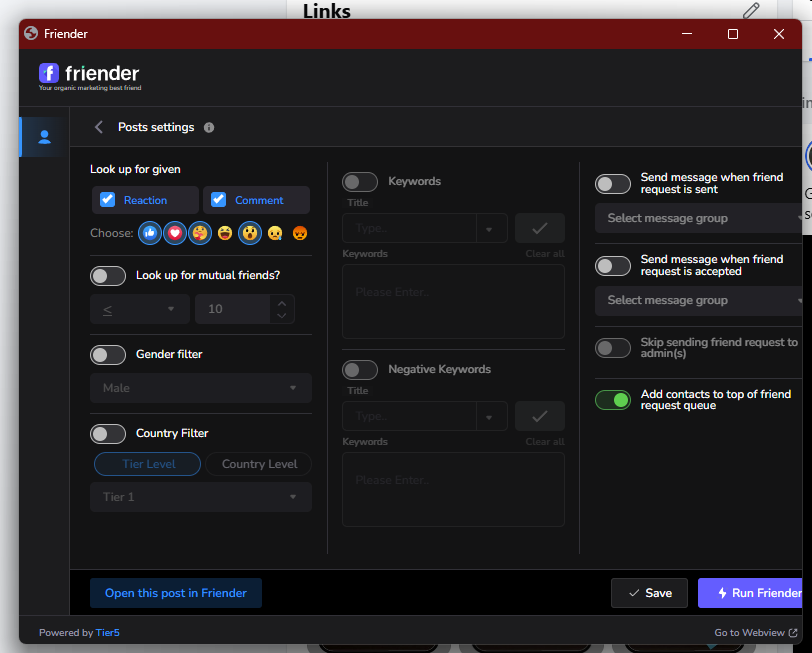
    Actual Friender screen: choose who enters your request queue.
    Actual Friender screen: choose who enters your request queue. Select the image to view the full original.

    02 · TURN CONNECTIONS INTO CONVERSATIONS

    Put the audience you already have to work.

    Your next sales conversation could start with someone already connected to you. See who engages, choose a relevant segment, and invite them to the next step in your offer.

    • Sync contacts and organize interests with labels and tags.
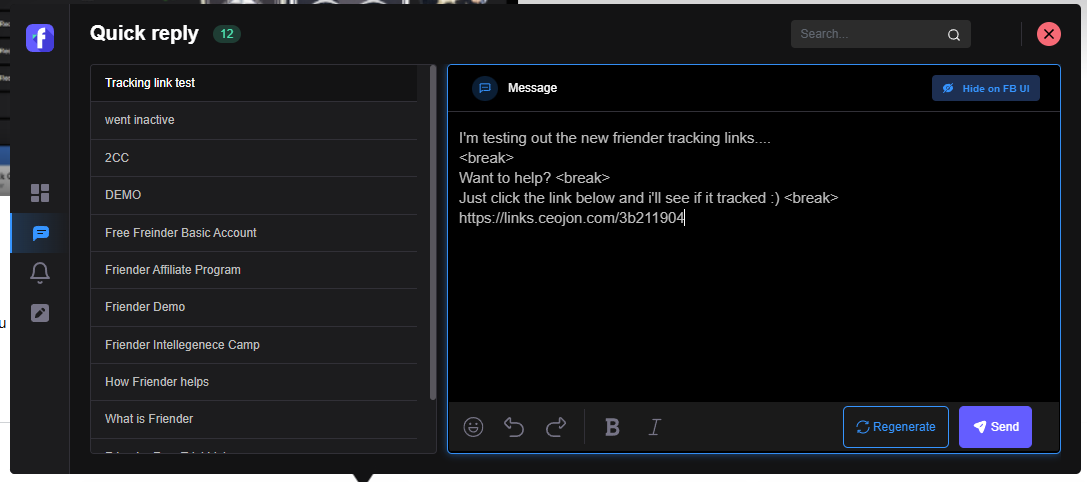
    • Use quick replies and templates to personalize messages faster.
    • Keep notes, reminders and contact context beside the conversation in Messenger.

    You can pick up where you left off and make the conversation about the person in front of you.

    Actual Friender screen: quick replies inside Messenger.
    Actual Friender screen: quick replies inside Messenger. Select the image to view the full original.

    03 · GIVE YOURSELF TIME BACK

    Build the follow-up once. Give every lead a next step.

    Create the journey you want someone to take—from first interest to your offer, and from purchase to customer onboarding. Friender runs the messages and actions you configure.

    • Schedule campaigns for selected contacts and offers.
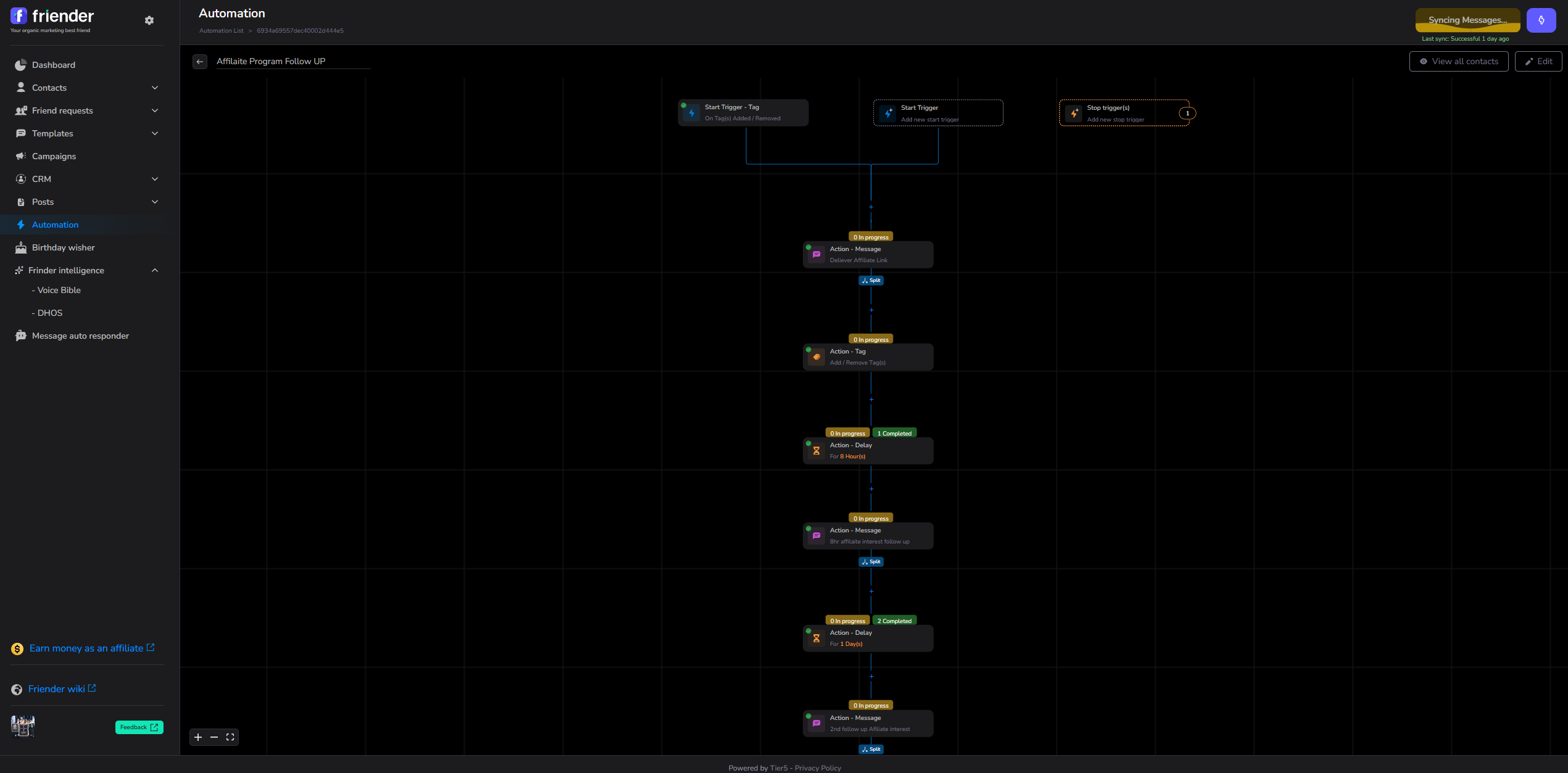
    • Build message sequences with delays, filters and branches.
    • Start workflows from tags, labels, contact changes and tracked events; organize deals in sales pipelines.

    Your follow-up has a system behind it, while you focus on the conversations that need you.

    Actual Friender screen: messages, delays and actions in the visual builder.
    Actual Friender screen: messages, delays and actions in the visual builder. Focused view. Select the image to view the full original.

    04 · CONNECT THE CONVERSATION TO THE SALE

    Know what happens after you send the link.

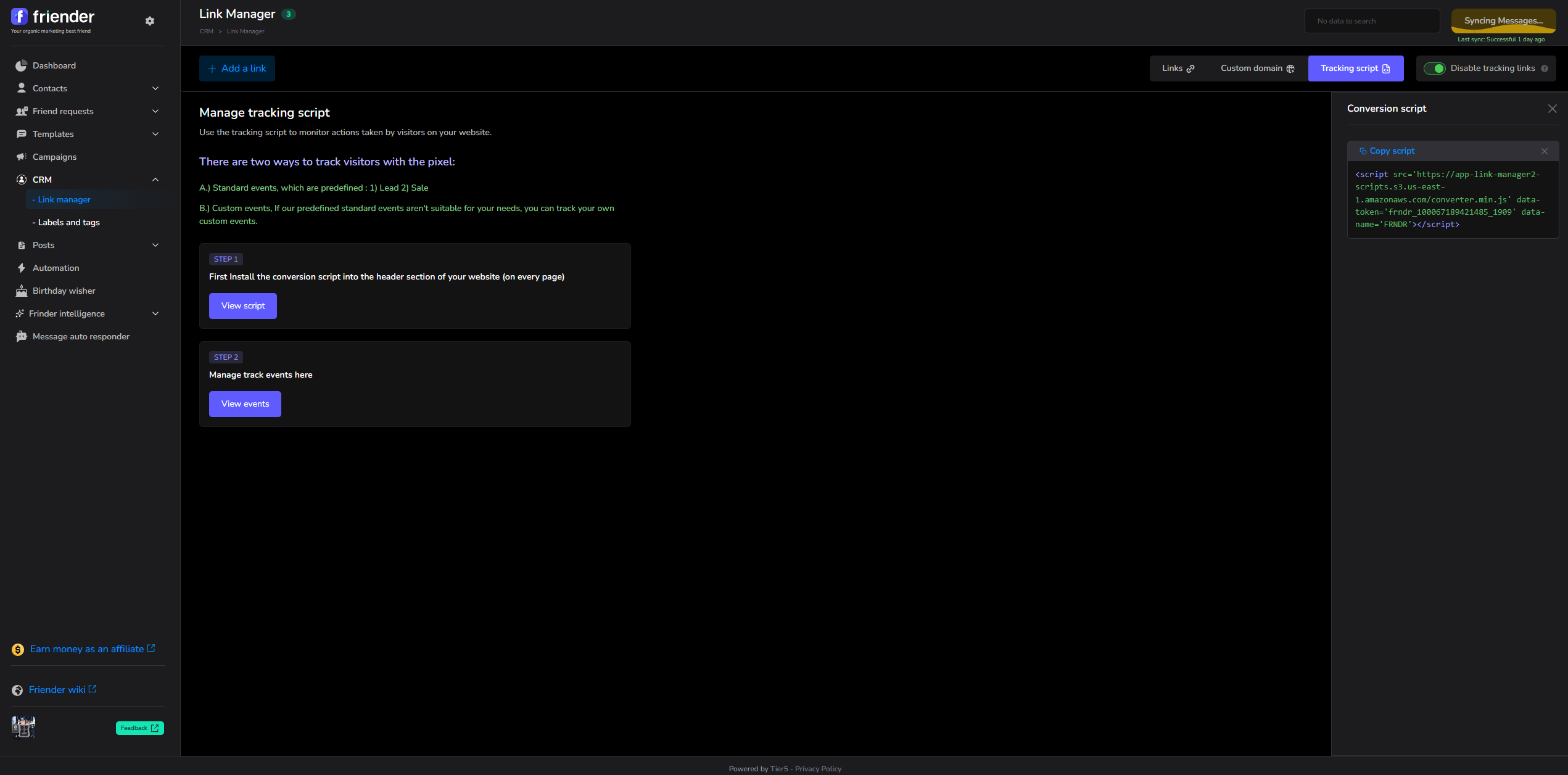
    A conversation becomes much more useful when you can see the next step. Friender’s Link Manager and tracking script connect supported website activity to recognized contacts arriving through your tracked links.

    • Create tracked links and install your account’s script on your website.
    • Configure Lead events at signup and Sales events at confirmed purchase, including the actual sale value.
    • Use those events to start relevant follow-up or customer onboarding.

    You can follow the journey from contact to click to customer—and respond to what they actually do.

    Actual Friender screen: website tracking-script setup. Events require configuration on your site.
    Actual Friender screen: website tracking-script setup. Events require configuration on your site. Focused view. Select the image to view the full original.

    Keep showing up for the people you want to serve.

    Stay visible with useful content

    Schedule posts, plan your calendar and review engagement. Post replies and keyword responses help turn interest in your content into the next conversation.

    Give relationships regular attention

    Use birthday wishes and follow-ups, engagement tracking and friend cleanup to keep your Facebook audience organized and active. Group Monkey adds group-management tools.

    Create with more context

    Intelligence adds contact analysis, profile enrichment, message-history sync and AI help for posts and messages. Voice Bible guides content toward your writing style.

    Your next 7 days with Friender

    Build a system for your next sales conversation.
    Try it free for 7 days.

    Bring one audience and one offer. Use your trial to connect the steps that turn attention into a customer relationship.

    01

    Choose your audience

    Find relevant prospects through ad engagement, or sync and segment the contacts you already have.

    02

    Build your follow-up

    Create your message, choose your schedule and set up a workflow that gives each contact a next step.

    03

    Connect your results

    Create a tracked link, install your website script and configure the events that matter to your offer.

    Your trial: Friender Intelligence

    Includes Pro’s audience, Messenger, campaign, automation, pipeline and website-tracking tools—plus Intelligence’s AI features.

    $0for your first 7 days

    Start my 7-day free trial

    $0 for 7 days. Then $99/month. A card is required.
    Cancel before your trial ends to avoid renewal.

    Renews monthly at $99 until canceled. Connect your Facebook account through the Chrome extension. AI features use your own supported OpenAI or OpenRouter key; usage charges apply through your provider.

    Ready to build your first workflow?

    Start my 7-day free trial

    $0 for 7 days. Then $99/month. A card is required.
    Cancel before your trial ends to avoid renewal.